Fetch CSS based on @media queries (not what you think!)

Goal

Download and apply only the styles I need.

Media queries are awesome! They allow me to target CSS rules to very specific solutions. If you’ve been reading my posts here, you’ll realize what my ultimate goal is: to produce a single product that runs properly on all targeted devices (desktop browsers, tablets, and smart phones). And my solution must be fast (light-weight) since mobile devices are still a bit under-powered.

@media queries are commonly part of (within) a CSS file. For example, in the code below, a width of 743 pixels is assigned to the “Hello World” div for only “screen” devices with a width of between 801 and 1280 pixels.

@media only screen
and (min-width :  801px)
and (max-width : 1280px)
{
   #helloWorld
   {
      width: 743px;
   }
}	

Intriguingly, @media queries can also be part of a <link> command. This is the example we often see when researching how to use @media queries.

<link rel="stylesheet" type="text/css" media="screen" href="sans-serif.css">
<link rel="stylesheet" type="text/css" media="print" href="serif.css">

This common example suggests that I should segregate my styles into CSS files intended for specific uses. In my personal project, this is exactly what I’ve done. Basically, I’ve set up 4 style sheets each designated for a specific range of screen widths.

<link rel="stylesheet" media="only screen                          and (max-width :  480px)" href="css/layouts/tiny.css" />
<link rel="stylesheet" media="only screen and (min-width :  481px) and (max-width :  800px)" href="css/layouts/small.css" />
<link rel="stylesheet" media="only screen and (min-width :  801px) and (max-width : 1280px)" href="css/layouts/medium.css" />
<link rel="stylesheet" media="only screen and (min-width : 1281px)                         " href="css/layouts/large.css" />

Problem

Problem is, this code still downloads ALL of the listed CSS files . . . even though I might only need the “tiny.css” on a smaller given smart phone.

Clearly, @media queries are not a complete solution since they still fetch all of the CSS files even if I know ahead of time that these CSS files/rules will never be used.

I want a solution that downloads and applies only the required styles for the given situation.

Solution

The first question is whether to use the @media queries inside the CSS or in the <link> commands. The answer is BOTH.

  • You’ll want them in the <link> commands in order to prevent the fetching of a given CSS file. More on this later…
  • You’ll also want them inside the CSS files in the event the client downloads multiple CSS files and needs to switch between them. For example, switching from portrait to landscape orientations might trigger switching from the tiny.css to the small.css rules.

Conditionally fetching CSS files

I’ve written a very small snippet of JavaScript that uses the @media queries in the <link> command to only download the CSS files that are relevant to the current device and situation.

This example uses the “width” @media query instead of the “device-width” for the following reasons:

  • width takes into consideration the “pixel ratio”. For example, a Google Nexus 7 has a device-width of 1280 x 800. However, it’s pixel-ratio is 1.33 which means that it reports a CSS resolution of 966 x 603 . . . the resolution the vendor believes is optimal for this device.
  • width changes based on orientation (orientation is just another resolution!). The iPad reports a device width of 768 in both portrait and landscape modes. The @media width value, however, properly changes as orientation is changed.
  • width affects desktop displays as the browser is resized. This allows a Web UI on a browser to relayout as necessary based on the current browser size. Checking @media device-width always reports the same number.
  • it’s much easier to base a series of @media statements on width since it doesn’t need to deal with all of the exceptions in dealing with device-width.

This code executes right when the file is loaded, and runs again as needed every time the device’s orientation changes or the window is resized.

NOTE: if the JavaScript method window.matchMedia() is not supported, this code then automatically allows and fetches the specified CSS files. In other words, it’s a fail-safe scenario when the conditional download mechanism is not available.

This code dynamically fetches only those files that are needed for the current situation …and downloads additional CSS files as needs change during execution.

Hope this helps!

   <script type="text/javascript" language="javascript">
      var head  = document.getElementsByTagName('head')[0];
      var links = document.getElementsByTagName('link');

      //Prevent adding the same <link> more than once
      function hasLink ( cssURL )
      {
         for ( x = 0; x < links.length; x++ )
         {
            var href = links[x].getAttribute ( "href" );
            if ( (typeof(href) != 'undefined') && (href === cssURL) )
               return true;
         }
         return false;
      }

      //Include CSS if Media Query matches or @media examination is not supported
      function includeCSS ( mediaQuery, cssURL )
      {
         var deviceQuery = window.matchMedia( mediaQuery );
         if ( (deviceQuery.matches == true) || (typeof(window.matchMedia) === 'undefined') )
         {
            if ( hasLink ( cssURL ) == false )
            {
               var link = document.createElement('link');
                   link.href = cssURL;
                   link.rel  = 'stylesheet';
                   link.type = 'text/css';
               head.appendChild(link);
            }
         }
      }

      function evaluateLayoutCSS()
      {
         includeCSS ( "only screen                          and (max-width :  480px)", "css/layouts/tiny.css"  );
         includeCSS ( "only screen and (min-width :  481px) and (max-width :  800px)", "css/layouts/small.css" );
         includeCSS ( "only screen and (min-width :  801px) and (max-width : 1280px)", "css/layouts/medium.css");
         includeCSS ( "only screen and (min-width : 1281px)                         ", "css/layouts/large.css" );
      }
      evaluateLayoutCSS(); //Run early at least once
   
      //Register events to recalculate the media queries on orientation and size changes
      window.onorientationchange = function() { evaluateLayoutCSS() };
      window.onresize            = function() { evaluateLayoutCSS() };
   </script> 
Using JavaScript to read @media values

As most Web developers already know, using @media queries in combination with %-based (or em-based) values in your CSS is the best way of presenting your Web pages optimally on a variety of output devices such as desktop displays, mobile phones, and tablets.

Responsive Web Sites

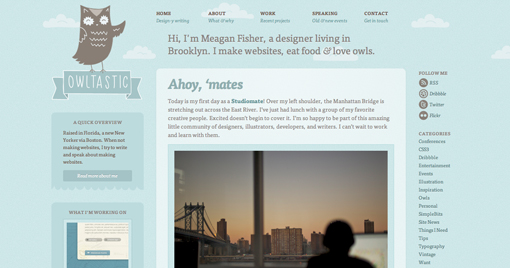
For those of you who don’t know what I’m talking about, check out these fine example sites. To see what I mean, click on a picture to load them into a browser window. Then slowly change the size of the browser and watch how these Web sites handle differences in screen size.

You’ll note that they dynamically change font and images sizes, and even completely change layouts, all based on the browser’s display size.

The point is that these sites look great all the way from a huge desktop screen down to the smallest smart phone display. That’s what we’re after.

OWLTASTIC

Deren K

Boston Globe

About.com

Inconsistent @media Values

As I set out to define my CSS files, my simple @media queries weren’t always working. Unfortunately, I quickly realized that I couldn’t just use “@media max-device-width:320px” and other increasing pixel values to define the range of devices I was going to support.

Bottom line, the expected results from the @media queries were not consistent across the various devices. For example:

  • While most devices report the “@media device-width” based on the current orientation of the device, the iPad for some reason always reports its width as 768px in both landscape and portrait orientations!
  • While most devices report the “@media device-width” as the actual number of pixels that make up the width of the device, some devices report a value less than the actual number of pixels in order to present a larger view to the user. For example the iPad 3′s display is physically 1536 x 2048. However, it reports a value of 768px for the “@media device-width” value.

Determining Actual @media Values for a Device

In order to create @media queries that isolate the range of devices I want to support, I needed to learn the values devices actually report for the various @media queries.

I hoped (assumed) I’d just find some simple Web page that I could load on each of the devices I was targeting and it would tell me the device’s actual values.

Turns out I was very wrong!

After a lot of Googling around, not only does this very useful Web page not exist (at least I can’t find it), but JavaScript can’t directly access these values either! So I can’t easily write my own page as a solution.

Problem

As of this writing, there are currently no properties on the window or screen objects to access the values examined by the @media queries. In other words, I can’t just “alert(‘Device Width: ‘+screen.deviceWidth)” to display all of the @media values.
Turns out a few are available, but I can’t be 100% certain they’re the same as the @media queries

Clearly, I can “test” against a given @media value. For example, I can write window.matchMedia( “min-device-width:768px” ), and this will return true for all devices that are 768 pixels wide or larger.

However, I can’t easily report what the device’s actual pixel width is. For example, my desktop screen is currently 1600 pixels wide, but would also match this query. In some cases, I could use “other” older JavaScript-accessible properties, but I specifically want to know how the @media values are reported since this is how I’m going to code my CSS.

Solution

I have created a simple Web page that you can load into any browser on any device, and it will directly report the value of each of the device’s @media queries.

It does this by simply testing every value until a value reports true. For example, for determining the device’s “@media device-width” value, it tests every value from 0 to 4000, and in the case of my desktop stops once it reaches 1600.

Clearly, there is a distinct speed issue here …especially if I examine 15 or 20 properties. To speed things up, I’ve created a set of “likely’ values for each property. For example, when reporting on the “@media color” value, I pass in [8,10,12,16,24,32] as likely tests. If this list fails, then it will test every value from 0 to 4000. In most cases, the likely values are used. In a few cases — usually when a browser doesn’t support a given @media query — it’ll take a bit longer …but no more than 5 seconds or so.

It’s a work-in-progress. As I get to using it on more devices, I’ll refine, add, update as necessary. But for now, this should do quite well.

Hope it helps you too.

BTW, after this analysis I ended up creating the following style sheets. For more details on this, and a much better dynamic implementation, see my post entitled Fetch CSS based on @media queries (not what you think!).

<link rel="stylesheet" media="only screen                          and (max-width :  480px)" href="css/layouts/tiny.css" />
<link rel="stylesheet" media="only screen and (min-width :  481px) and (max-width :  800px)" href="css/layouts/small.css" />
<link rel="stylesheet" media="only screen and (min-width :  801px) and (max-width : 1280px)" href="css/layouts/medium.css" />
<link rel="stylesheet" media="only screen and (min-width : 1281px)                         " href="css/layouts/large.css" />


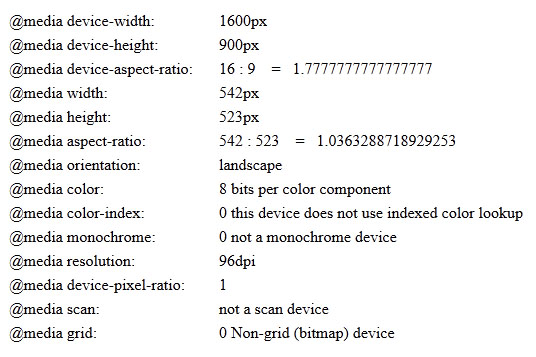
See your device’s @media values now.

Here’s what the output looks like

A New Kind of Stylesheet

Adding Variables to CSS

Goal


Make it MUCH easier for customers to brand Web-based products

Note that the primary goal here is NOT to make it easier for developers to create CSS files. The primary goal is for CUSTOMERS to more easily modify CSS files. In other words, even though we could modify CSS in much more dramatic ways to make it easier for developers to create these files, the goal here is not developers, rather end users. So, the CSS file needs to remain as user friendly and familiar as possible while still making it much easier to brand the CSS.

Problem Statement

  • CSS files usually contain hundreds of color and font codes
  • Color and font codes that should be the same are sometimes slightly different. E.g., dark gray is sometimes #333333; sometimes #313233. Dumb.
  • It’s very difficult for customers to find, understand, and properly change these codes

We need to find a solution that makes it easier for customers to modify our CSS files without having to hunt-and-peck for the relevant colors codes.

Solution 1

  • A wonderful package supporting all of the latest proposed CSS features such as variables, mixins, operations, functions
  • I’d love to use this package. However:
    • it is written in JavaScript and therefore requires Node.js and Rhino
    • that’s 68MB worth of files I need to lay down on customers’ computers
    • over > 5000 files
    • from Java, would have to do an external execution in order to compile our CSS files
    • Even if I automated this work, it’s an awful lot to ask of customers just to have variables in CSS

I can’t use Less because I need to find a solution that consumes very little resources to compile the CSS

Solution 2

  • Like Less, a package supporting all of the latest proposed CSS features including variables, mixins, operations, functions, nested rules, conditional expressions, and more.
  • From a developer’s perspective, this is the package I’d choose (I think it’s slightly better than Less).
  • However I can’t for many of the same reasons as Less:
    • it is written in Ruby (a great language) and therefore requires a Ruby interpreter on customers’ computers
    • For a Windows environment, that’s 30MB worth of files I need to lay down on customers’ computers
    • over > 93,000 files
    • and like Less, I’d still have to do a slow, external execution environment offering little control over the compilation of our CSS files
    • Even if I automated this work, it’s an awful lot to ask of customers just to have variables in CSS

I can’t use Sass because it requires Ruby and lots of resources to compile the CSS. I need something that is light-weight, preferably runs in Java, and allows me to make tweaks should I need to.

What’s Coming in CSS

Looks like whatever solution I find, it’s going to be somewhat temporary since the W3C is already under way to add some of these awesome features into CSS.

The ideal solution would not only be easy to use for customers, but would also easily migrate to the standard solution once that’s fully supported by all browsers in a year or two.

Seeing that the goal is to make it easy for customers to brand our CSS, the ideal solution will look as much like standard css as possible. In other words, it will NOT use all these new Less and Sass CSS features. Bare minimum is best.

Solution 3

  • ZUSS is a pure Java package; that’s good already since that means it can be part of my standard development environment. I can use either the jar directly, or modify the source code as needed.
  • It’s tiny
    • 89K (Wow!! — compare that to Less and Sass above)
    • 73 files in 1 jar (again Wow!)
  • ZUSS supports most of the new CSS features the other packages support:
    • Variables
    • Mixins
    • Nested Rules
    • Functions
    • Includes
    • Conditional Expressions
  • ZUSS provides a small servlet that compiles the CSS files on demand (when requested from the browser)
    • This allows our CSS to be either in a War file (which is how Web products are usually distributed) or in an external directory where customers could copy and edit the files.
    • Caches CSS for future requests
    • Recompiles as CSS files are changed
  • ZUSS is licensed under the GNU Lesser GPL which means it’s very developer and distribution friendly

Fonts

Here’s how a font is defined in my new CSS:

@global-font-family()
{
   font-family: Helvetica, Arial, sans-serif;
}

Notice that it begins with an @ symbol. This designates a variable in the ZUSS language. In other words, global-font-family() becomes a mixin when used.

Notice also that global-font-family() contains a full CSS attribute declaration: font-family: Helvetica, Arial, sans-serif;    We could have included any number of other attribute definitions, for example size, color, margins, line height, font weight and style, etc. Anything placed within the braces is included when used elsewhere in the CSS file.

Here’s the mixin used elsewhere in the CSS:

.welcomeHeader
{
   @global-font-family();
   font-size: 2em;
}

Sweet !!

Colors

Here’s how a color is defined in my new CSS:

@product-color: #8cc63f; /* product name in nav bar, links, quote bin header, active button background, slider value, bread crumb sep */

Any time I want to use that color, I simply:

.headerLogoText
{
   color: @product-color;
}

Functions

If you paid attention to the comment in the color variable defined above, you’ll note we’re using that same color in lots of areas throughout the product. A good 15 places use that color directly, as is. However, buttons have gradients, hovers, and pressed states. Links change colors when hovered or visited.

And we’d like to use a “faint” version of the color when selecting items in rows. Rather than having the customer specify all the variants of a given color, wouldn’t it be cool if we could automatically “derive” the color from the primary color. That way, all the customer has to specify is a single color …and none of its variants.

ZUSS offers two kinds of functions to do this type of task:

  • A simple function defined in CSS permitting basic math functions and color manipulations
    @lighten(@color, @diff: 10%): @color * (1 + @diff);
  • Java-defined functions that can be called directly by our CSS and can provide any range of sophistication
    @lighten(@color, @diff: 10%): @import com.netiq.agility.client.internal.ColorUtils;

We chose to go with the more sophisticated Java-based functions permitting more accurate color calculations.

  • Here’s our ColorUtils.java class in which we created a series of high-fidelity color rendering methods
  • These are based on the HSB (Hue, Saturation, Brightness) color model which is also supported by the basic Java Color class and by Photoshop.
    • It’s much easier to make a color brighter by simply adjusting the “brightness” factor than trying to calculate Red, Green, and Blue values.

Derived Colors

Now that we have color variables and high-fidelity color manipulation routines, let me show you what we did for the single “product color” which I think you’ll agree most Web interfaces have:

/* User-provided Colors */
@product-color:                     #8cc63f;   /* product name in nav bar, links, quote bin header, active button background, slider value, bread crumb sep */

/* Derived Colors - users do NOT need to edit these colors */
@product-color-lighter:             @lighten   ( @product-color, 15% );
@product-color-darker:              @darken    ( @product-color, 15% );

@product-color-hover:               @highlight ( @product-color, "-92%" );
@product-color-hover-lighter:       @lighten   ( @product-color-hover, 3% );
@product-color-hover-darker:        @darken    ( @product-color-hover, 5% );

@product-color-select:              @highlight ( @product-color, "-78%" );
@product-color-select-lighter:      @lighten   ( @product-color-select, 3% );
@product-color-select-darker:       @darken    ( @product-color-select, 5% );

/* hover */
@active-bhover-color:               white;
@active-bhover-background-color:    @lighten   ( @product-color, 10% );
@active-bhover-background-start:    @lighten   ( @active-bhover-background-color, 5%);
@active-bhover-background-end:      @darken    ( @active-bhover-background-color, 12%);
@active-bhover-border:              @darken    ( @active-bhover-background-color, 15%);
@active-bhover-shadow-color:        @shadow    ( @active-bhover-background-end );

/* pressed */
@active-bdown-color:                black;                                          /* invert the hover color */
@active-bdown-background-color:     @darken    ( @product-color, 5% );
@active-bdown-background-start:     @active-bhover-background-end;                  /* invert the hover color */
@active-bdown-background-end:       @active-bhover-background-start;                /* invert the hover color */
@active-bdown-border:               @darken    ( @active-bdown-background-color, 12% );
@active-bdown-shadow-color:         @shadow    ( @active-bdown-background-end );

We’ve created 20 variants on the primary user-provided “Product Color”. These 20 colors are then used throughout the CSS whenever a product-color-related accent is desired.

  • Links (normal, hover, visited)
  • Buttons (gradients for normal, hover, pressed)
  • Product logo
  • Header colors
  • Scroll bar thumb
  • Bread crumb separators
  • Triggers in various UI widgets (combo, spinner, date picker, etc.)
  • List selection and hover
  • many other UI elements use versions of the product color !

In all, there are hundreds of places throughout the CSS where these 21 colors are used.

I think you’ll agree, that’s a lot of benefit for the customer …and they only had to define 1 color value to do so !!!

Note that in our final implementation, we ask the user to define approximately 15 primary colors in a single location at the top of the CSS file. And that’s it. Press refresh in your browser, and the entire color scheme changes throughout.

Includes

To make our files even simpler, we used ZUSS’s include ability to hide our function declarations and derived color definitions in separate include files that our customers will never see as they edit the CSS to make their own Themes.

@include functions.ncss;
@include derived_colors.ncss;

Provide a Theming Generator

Come to think of it, now that our CSS is sssssoooooooo simple, we could very easily produce a simple dialog within our product that allows the user to define the colors right from the UI …rather than having to find/copy/edit/save the CSS in the file system.

This “Theme Creator” dialog would be very simple to create. Just ask for a small set of color and font definitions, show examples of each in action, ask for a Theme name, and that’s it.

I’ll leave this for a future exercise to blog about.

So, which table is best?

I propose DataTables is the best choice for any project wanting to provide a single solution for both desktop and mobile devices.

While both jqGrid and DataTables are excellent technology and both meet the “good enough” criteria, DataTables has a slight edge for mobile devices.

* note that SlickGrid was eliminated as a candidate.

Here are my reasons for proposing DataTables:

  • DataTables has a smoother scrolling algorithm on mobile devices (iPad 3)
  • DataTables auto-eliminates the scroll bar and uses the device’s scrolling method
  • jqGrid’s styling is more heavily bound to JQuery UI, creating greater conflict as we try to be JQuery Mobile compliant
  • DataTables implements Virtual Rendering …deferring draw calls until needed
  • By Default, DataTables download size is considerably smaller: 25K vs 68K
  • DataTables has an excellent unit test suite comprising over 2800 tests
  • DataTables provides over 130 pre-built examples
  • DataTables provides a nicer ability to “expand” a row to show additional detail

Of course, jqGrid also has some advantages over DataTables. However, we do not need these in our current solution. For more details, see the jqGrid Evaluation post.

Using DataTables with ThemeRoller – Mobile styles

Since our project requires a single code base for both desktop and mobile clients, the list we choose needs to look good in both places. Ideally, we could limit ourselves to just the JQuery-Mobile styles, and it would look good on both. This post attempts to investigate that objective:

Useful Links

What styles apply to a list?

Here’s my first attempt at styling a DataTables table using JQuery-Mobile styles

Ignore how ugly it looks …I’m just learning about JQuery-Mobile styles, and I’m trying lots of different things in this image all at once.

NOTE 1: I have not yet redefined the style definitions in my Theme-Roller produced stylesheet. That’s why it looks so ugly.

NOTE 2: I tried letting JQuery-Mobile apply its styles based on the data-role type attributes …but you’ll note that doesn’t seem to work for a dynamically-produced table

NOTE 3: For now, I’m using swatch “A” from my stylesheet. Not quite sure yet if I’ll want to create a swatch just for tables or not. For now, I’m thinking no …each swatch could redefine the table’s appearance.

Here’s what I learned

JQuery Mobile – Applying the correct List styles

  • For now anyways, the closest thing to tables JQuery-Mobile has support for is “lists”
  • Therefore, I applied the following styles which are the same styles JQuery-Mobile lists use:
    • table headings – ui-li ui-bar-a
    • rows (<tr>) – ui-li ui-btn ui-btn-up-a
    • row hovers – ui-btn-hover-a
    • Heading data in cells – ui-li-heading
    • Normal text in cells – ui-li-desc
    • Bolded data in cells – just use <strong> around text within the ui-li-desc div
    • I still need to style the pagination control. I will probably use DataTable’s various $.fn.dataTableExt.oStdClasses.* variables to do that.
      • I guess on that note, you’ll find that I set the “bJQueryUI” flag to false
      • JQuery UI’s styles just conflict too much with JQuery-Mobile’s styles

Making Changes to the List style definitions

  • I also updated some of the styles in my ThemeRoller-produced style sheet
    • added ui-bar-a:hover – to give a hover effect on the column headers

JQuery Mobile – “Data-Role” Attributes

  • I also had to mess around with a few other things to get it to behave properly within a JQuery-Mobile environment
    • just to be proper, I added the “ui-listview” style to the DataTables table object
    • likewise, I added the data-role of “listview”
    • I had to redefine the display attribute for rows to table-row
    • and did the same thing for header rows: display:table-row;
  • Note the data-icon=’arrow-r’ text in the bar above the table. See the little “right arrow” icon at the far-right of the bar. Seems to work fine.
    • Now take a look at the same text in each row’s “Name” column. The text is there, but the actual icon isn’t.
    • In other words, I can’t seem to get JQuery-Mobile to dynamically render my styles within the table. More on this in a future post I suspect :-)

DataTables – sDOM – moving things around

  • Take a look at the navigation and search bars …they’re way at the top of the screen
    • That’s because I created my own <div>s and wanted to move these controls elsewhere in the document
      • var search = $(‘.dataTables_filter’); $(‘#search’).append ( search );
      • var navBar = $(‘.dataTables_paginate’); $(‘#page_nav_bar’).append ( navBar );
    • Why didn’t I just use sDOM to move things around?
      • Because sDOM can only create the various DataTable controls above or below the table (even both).
      • But it cannot create them disconnected from the table. In my case, I will have other controls between the table’s search box and the table itself.
      • I think using JQuery’s append() method to move things around is quite nice …except it does this after the items are already attached to the DOM …this might be a flicker or speed issue. More on this later…

SlickGrid Evaluation

SlickGrid Links

- Home: https://github.com/mleibman/SlickGrid/wiki
- Examples: https://github.com/mleibman/SlickGrid/wiki/Examples
- AJAX paging: http://mleibman.github.com/SlickGrid/examples/example6-ajax-loading.html
- Used By: https://github.com/mleibman/SlickGrid/wiki/Used-by

NOTE

A full evaluation of this product was not performed. Although I spent as much time in the evaluation as the other tables, I determined that SlickGrid is no longer a candidate for our use.

Here’s what I learned:

1) SlickGrid is primarily designed around the “paging via scroll bar” mechanism. Actually, to be even more precise, it’s really “rendering via scroll bar”. SlickGrid primarily attempts to load all records into JavaScript, then defers rendering of those records until they’re scrolled into view.

2) SlickGrid does have a remote paging capability as seen in Example 6. However, almost all of its examples, and most of its add-ons, are geared around the concept that everything’s already loaded into Javascript variables. When using server-side paging, it does offload the filtering and sorting to the server.

3) Example 4, the Grouping Example, and the Optimized DataView Example show a paging navigator control (enabled via the small icon at bottom-right). However, examples do not exist for server-side paged data.

  • The current Slick.Controls.Pager widget (which produces the nav bar) was intended for use with the DataView class. The DataView class, in turn, was designed to work with fully-loaded data. Hence, the navigation bar cannot at this time be used with AJAX- loaded data. There are people who have gotten it to work with various hacks, but this is not yet part of this library.

4) SlickGrid does NOT use <table><tr><td> codes. Instead, it uses a series of div’s
5) SlickGrid is not as mature, well supported, or well documented as jqGrid or DataTables

============================================================

Evaluation

In order to properly evaluate jqGrid, DataTables, and SlickGrid against our “good enough” criteria, I set up a test REST server that returns “real” JSON data. The server contains a list of over 10,000 objects.

While the data is real, the response time is not. The test REST server pre-fetches all real data from back-end services, then cache’s that data internally in order to eliminate server response time in the evaluation. While real server calls are measured in 10ths of seconds, my test REST server’s average response time is 3ms for any given page of 50 objects.

I had to create unique REST end-points for each of my tables in this evaluation because each uses different parameters to control the list behavior. They all pull from the same list of cached objects.

I created a test html file — /SlickGrid/slickgrid.html — which creates a SlickGrid table and loads Users (50 at a time from a set of 10,000) from a SlickGrid-specific REST end-point.

1) Performance is #1

  • performance of fetching remote data is outstanding …just like the other table controls
  • 50 records: desktop, round-trip is 3ms, iPad3 it’s about .3s – .5s
  • 500 records:
  • SlickGrid implements Virtual Rendering preventing the drawing of a given row until it is scrolled into view
  • SlickGrid is capable of post-rendering work. For example, filling a given cell with a value from the server even after the row’s been scrolled into view. Here’s an example. Post-rendering takes place only when the UI is idle. Rows are processed 1-by-1.

2) Device requirements: performance and functionality will be determined by ICS-based tablets, not older Honeycomb devices, not smart phones

  • As noted above, performance on an iPad3 is outstanding

3) Table paging and navigation will be performed by next, prev, first, last, and #’s links

  • SlickGrid does not provide a navigation control for ajax-loaded data since it is primarily a page-via-scrollbar solution
  • Turns out the current Slick.Controls.Pager widget (which produces the nav bar) was intended for use with the DataView class. The DataView class, in turn, was designed to work with fully-loaded data. Hence, the navigation bar cannot at this time be used with AJAX-loaded data. There are people who have gotten it to work with various hacks, but this is not yet part of this library.

4) The table will load 1 “page” of data at a time, if the rows don’t “fit” the vertical table size, users may scroll to see the rest of the page

  • SlickGrid’s loads 1 “page” of data at a time. Previously loaded data is cached.
  • However, it does not provide a navigation control. Hence, the only pagination is via the scroll bar.
  • If the fetched rows don’t “fit” the vertical table size, users may scroll to see the rest of the page
  • The table can be sized such that it grows as needed to accommodate all rows

5) The table will not cache previous requests (to protect mobile devices; and if #1 is met, no need)

  • SlickGrid by default CACHE’s previous requests
  • Uncertain if this can be turned off

6) All paging, filtering, sorting will be performed by the back-end; none in the client

  • SlickGrid can be set up to paging, filtering, and sorting in both the UI and the back-end
  • However, SlickGrid’s DataView (required for using the navigation widget) is only available for fully-loaded data (not AJAX data)
  • When loading AJAX data, SlickGrid performs paging, filtering, and sorting by the back-end

7) We will filter on only string data originating from the server for now

  • Unexamined

8) Code size should not exceed 200K (minified and gzip’d); the smaller the better

  • Unexamined

9) We will only select a mature, well supported Table widget. We will not make our own.

  • Current version: 2.0.1, actively developed
  • This product does not appear to be as mature, as well supported, or as well documented as jqGrid or DataTables

10) Theming Support :

  • Unexamined

11) Table must by stylable as in our mockups

  • Unexamined
  • Every cell can be given a specific style name. Hence, I believe the table is stylable
  • SlickGrid is able to use John Resig’s micro-templates while still using SlickGrid’s virtual rendering technology

12) Single select for Marketplace; likely multi-select for future

  • SlickGrid supports single selection via row-selection or checkboxes
  • multi-select with checkboxes …but mostly unexamined

13) In-row actions for Marketplace; likely top-of list actions for future

  • SlickGrid supports any buttons we’d like to place in a row
  • SlickGrid is capable of post-rendering work. For example, filling a given cell with a value from the server even after the row’s been scrolled into view. Here’s an example. Post-rendering takes place only when the UI is idle. Rows are processed 1-by-1.

14) No in-cell editing for now

  • SlickGrid does support in-cell editing, however this can easily be turned off

15) No “View As…” alternate views for now

  • SlickGrid does not directly support alternate views for its tables

16) No conclusion on table width handling. However, the survey says most people would like to see columns shrink until it’s ridiculous, then hide low-priority columns altogether

  • Columns can be fixed or proportionally sized
  • Data within the cells shows ellipses if cell contents exceed cell size

17) The table needs to support a distribution-friendly license

  • SlickGrid is licensed under the MIT

jqGrid Evaluation

Test REST Server
In order to properly evaluate jqGrid, DataTables, and SlickGrid against our “good enough” criteria, I set up a test REST server that returns “real” JSON data. The server contains a list of over 10,000 objects.

While the data is real, the response time is not. The test REST server pre-fetches all real data from back-end services, then cache’s that data internally in order to eliminate server response time in the evaluation. While real server calls are measured in 10ths of seconds, my test REST server’s average response time is 3ms for any given page of 50 objects.

I had to create unique REST end-points for each of my tables in this evaluation because each uses different parameters to control the list behavior. They all pull from the same list of cached objects.

jqGrid Links

- Home: http://www.trirand.com/blog/
- Wiki: http://www.trirand.com/jqgridwiki/doku.php
- Examples: http://www.trirand.com/blog/jqgrid/jqgrid.html
- Addl Examples: http://www.trirand.net/demo.aspx
- Code: http://www.trirand.com/blog/jqgrid/downloads/jqgrid_demo38.zip
- Column Model: http://www.trirand.com/jqgridwiki/doku.php?id=wiki:colmodel_options
- Params: http://www.trirand.com/jqgridwiki/doku.php?id=wiki:options
- Themes: NOTE: jqGrid uses jQuery UI – ThemeRoller to style its table. This could be a problem for us because JQuery UI and JQuery-Mobile don’t play well together. We’ll see…
- Commercial Web Site: http://www.trirand.net/

Evaluation

I created a test html file which creates a jqGrid table and loads 50 objects at a time from the REST end-point mentioned above. Remember, it’s a cache’d list.

1) Performance is #1

  • Like DataTables, performance is outstanding …actually, when fetching records, it’s identical because it’s the same back-end
  • 50 records: desktop, round-trip is 3ms, iPad3 is about .3s – .5s
  • 500 records: desktop, round-trip is 15ms, iPad3 is about 1s
  • Unlike SlikGrid and DataTables, jqGrid does not implement Virtual Rendering. As far as I can tell, it renders the full result set as soon as it’s received. Don’t know how much of a performance hit this is, but it could be a big deal depending on what you put in your cells.
  • However, with jqGrid’s gridview parameter, it is able to “append” all the rows with a single call …making it a very fast operation. Note that this choice comes with some limitations: for example, no afterInsertRow event, etc.
  • I do not like how jqGrid handles the scroll bar on an iPad3. While it appropriately hides the scroll bar, the table does NOT take over the available space. Further, when scrolling, it does not use the iPad3′s “thin” scroll bar. Finally, when fast swiping, it stops scrolling immediately after you’ve quit touching …to smooth scroll stop like you’d expect.

2) Device requirements: performance and functionality will be determined by low-powered, ICS-based tablets, not older Honeycomb devices, nor smart phones

  • As noted above, performance on an iPad3 is outstanding
  • Performance on a Honeycomb smart phone (Galaxy S2 on T-Mobile) is acceptable (but not part of our required criteria)

3) Table paging and navigation will be performed by next, prev, first, last, and #’s links

4) The table will load 1 “page” of data at a time, if the rows don’t “fit” the vertical table size, users may scroll to see the rest of the page

  • jqGrid will load 1 “page” of data at a time
  • If the fetched rows don’t “fit” the vertical table size, users may scroll to see the rest of the page. Note my “scrolling” comments in the Performance section above.
  • The table can be sized such that it grows as needed to accommodate all rows

5) The table will not cache previous requests (to protect mobile devices; and if #1 is met, no need)

  • jqGrid by default does not cache previous requests
  • I am uncertain if jqGrid can be set up to pre-fetch addl pages or not ??????

6) All paging, filtering, sorting will be performed by the back-end; none in the client

  • jqGrid supports paging, filtering, and sorting in both the UI and the back-end

7) We will filter on only string data originating from the server for now

  • According to its doc, developers can specify sorting for various types including string, number, boolean, link, select and percent. However, I believe this is for client-side processing only, and is not part of ajax-based solutions.

8) Code size should not exceed 200K (minified and gzip’d); the smaller the better

  • File size: File size: CSS: 12K; JS 430K raw / 270K minified / 68K gzip’d;
  • 3 times larger than DataTables

9) We will only select a mature, well supported Table widget. We will not make our own.

  • jqGrid is currently in version 4.4.0 (released in June 2012)
  • and has been developed now for at least 3 years, since 2009 …but I actually suspect much longer since that was version 3.5.x
  • has over 8,500 threads (27,000 posts) in its on-line forums
  • Unknown number of unit tests …I’m uncertain how rock-solid this product is. Probably pretty good.
  • It does not provide very many pre-built examples …but the ones that are there suffice

10) Theming Support :

  • DataTables supports ONLY JQuery UI ThemeRoller classes
  • However, with the rich set of overridable events, I believe we could add/remove any styles we want …just like DataTables

11) Table must by stylable to may our particular look and feel

  • jqGrid does not specifically provide APIs to apply the styles we want throughout the table. However, with the rich set of overridable events, I believe it can be styled to match our needs …just like DataTables.
  • jqGrid provides a very rich Column Renderer which is passed the backing row Object and the property value …giving the renderer the opportunity to display addl fields in each cell
  • jqGrid does not really permit row expansion showing more details about a row Object. Any examples I’ve seen add additional rows …kinda klunky.

12) Row selection (single select for now; multi-select for future)

  • jqGrid supports single selection via row-selection or checkboxes
  • I do not believe jqGrid supports multi-select across page boundries like DataTables does. Not sure I care though either

13) Links / Actions – in-row actions for now; likely top-of list actions for future

  • With its column renderers, jqGrid supports placing any data into a cell, including buttons/actions
  • jqGrid will use any specified Object value (for example: id) as the row’s ID attribute
  • jqGrid supports a very rich set of custom events which code can bind to

14) Editing: no in-cell editing for now

  • jqGrid supports in-cell / in-row editing
  • 2 method exist: see “Row Editing -> In-Line Navigator” and “Live Data Manipulation -> Navigator” examples

15) Alternate Views: no “View As…” alternate views for now

  • jqGrid does not directly support alternate views for its tables

16) No conclusion on table width handling. However, most people would like to see columns shrink until it’s ridiculous, then hide low-priority columns altogether

  • A jqGrid table normally sizes to the combined widths of its visible columns
  • However, you can also set the grid width, and the columns will adjust accordingly
  • I have not seen any example where the table’s width sizes dynamically. Seems to always be based on the grid’s “set Width”
  • Data within a jqGrid cell by default does NOT wraps unto addl lines (However, I’m sure we could easily change this with the CSS whitespace property). By default, when a cell’s data exceeds the cell bounds, ellipses show…
  • Uncertain if jqGrid could auto-show/hide low priority columns based on table width

17) The table needs to support a distribution-friendly license

  • jqGrid is licensed under the free MIT license
  • However, they have also launched an official commercial website http://www.trirand.net

Special Notes

  • jqGrid supports a truly awesome Column Model
  • I’m not too impressed with its “row” editor …adequate, but not beautiful. Of course, we can style any way we want.
  • I don’t know why jqGrid’s “row expansion” feature simply adds more rows. In my testing, I learned that I can place any amount of data into each cell, independent of the other cells. In other words, rows can have variable row height, and I could auto-expand the current row if I wanted to. I think they should specifically make an “expand” feature for rows to show addl detail.
  • jqGrid supports a grid within a grid!
  • jqGrid support a “tree” control by adding additional rows with indented values. Kinda cool!. Check out the “simple” example at: http://www.trirand.net/demotreephp.aspx
  • jqGrid has launched an official commercial website http://www.trirand.net. Check it out; there are some impressive demos there. You’ll note that they’ve spent considerable time trying to make a list and tree out of the same control. IOW, if you need a tree control, this is one is pretty good.

Notable Params

- 100 params
- 20 Events
- over 50 Triggered Events !!

ajaxGridOptions  - override all AJAX parameters including: error, complete, and beforesend events
altclass         - specify the class you want for the "alternate/zebra" rows.  Hmmm ...do they have this for all styles?
autowidth        - table auto-sizes (width) according to the size of its parent div
cellEdit         - enable editing
cellsubmit       - when editing, determine where the edits are saved (remote or clientArray/local)
colModel         - array which describes the parameters of the columns
deepempty        - uses JQuery to empty a row; prevents memory leaks
direction        - good support for Right-to-Left and Left-to-Right languages
forceFit         - all columns will always consume 100% of the table width (adjacent columns adjust as needed)
hoverrows        - enable row hover effects
idPrefix         - add a prefix to a row's ID
loadui           - control what to do while loading: disabale, enable, block
mtype            - HTTP GET or POST
pager            - enable paging controls.  NOTE: this also controls into what HTML div to place the pager
pgtext           - show details about the current list
prmNames         - controls the names of all the parameters sent to the server
scroll           - tells jqGrid to disable paging controls and to enable paging-via-scrollbar
shrinkToFit      - recalculate column widths as the table shrinks
sortable         - uses JQuery UI to permit reordering of the columns.  Since we're trying to be JQuery Mobile compliant, we do not want this.
toolbar          - defines the tools available in the toolbar
treeGrid         - enable the "tree" aspects of the grid control
url              - the source of the ajax data
userData         - addl data to make part of the request
afterInsertRow   - method gets called after a row is created
beforeRequest    - before a request is made
beforeProcessing - after a response is received (but before doing anything with it)
gridComplete     - after all received data is fully processed
onPaging         - after selecting a paging options, but before processing the data
resizeStop       - fires after resizing event has taken place (resizeStart also)
tons and tons of other options and events

DataTables Evaluation

Test REST Server
In order to properly evaluate DataTables against our “good enough” criteria, I set up a test REST server that returned “real” JSON data. The server contains a list of over 10,000 objects.

While the data is real, the response time is not. The test REST server pre-fetches all real data from back-end services, then cache’s that data internally in order to eliminate server response time in the evaluation. While real server calls are measured in 10ths of seconds, my test REST server’s average response time is 3ms for any given page of 50 objects.

DataTables
- Home: http://datatables.net/
- Examples: http://www.datatables.net/examples/
- Tests: https://github.com/DataTables/DataTables/tree/master/media/unit_testing
- Params: http://datatables.net/ref (125 params supported)
- Themes: http://datatables.net/styling/themes/ui-darkness

I created a test html file which creates a DataTables table and loads 50 objects at a time from the REST end-point mentioned above. Remember, it’s a cache’d list.

1) Performance is #1

  • performance is outstanding
  • 50 records: desktop, round-trip is 3ms, iPad3 is about .3s – .5s
  • 500 records: desktop, round-trip is 15ms, iPad3 is about 1s
  • Like SlikGrid, DataTables implements Virtual Rendering with its bDeferRender parameter Rendered rows/cells are retained for 1-page scrolling
  • I like how it handles the scroll bar on an iPad3. With no addl coding, it auto hides the bar, and lets the table take over the available space. Further, when scrolling, I like how it uses the iPad3′s “thin” scroll bar. Finally, it uses the device’s fast swipe gesture to continue to scroll the list even after you’ve quit touching; obviously it stops after a second or two …just as you’d expect.

2) Device requirements: performance and functionality will be determined by low-powered, ICS-based tablets, not older Honeycomb devices, nor smart phones

  • As noted above, performance on an iPad3 is outstanding
  • Performance on a Honeycomb smart phone (Galaxy S2 on T-Mobile) is acceptable (but not part of our required criteria)

3) Table paging and navigation will be performed by next, prev, first, last, and #’s links

  • DataTables supports both paging-via-navigation-controls, and paging-via-scrollbar

4) The table will load 1 “page” of data at a time, if the rows don’t “fit” the vertical table size, users may scroll to see the rest of the page

  • DataTables will load 1 “page” of data at a time
  • If the fetched rows don’t “fit” the vertical table size, users may scroll to see the rest of the page
  • The table can be sized such that it grows as needed to accommodate all rows

5) The table will not cache previous requests (to protect mobile devices; and if #1 is met, no need)

  • DataTables by default does not cache previous requests
  • DataTables can be set up to pre-fetch addl pages as needed

6) All paging, filtering, sorting will be performed by the back-end; none in the client

  • DataTables supports paging, filtering, and sorting in both the UI and the back-end

7) We will filter on only string data originating from the server for now

  • DataTables has made some effort to support sorting and filtering on representations of the data other than what’s displayed (Enums vs their string implementation; dates; etc.) However, I believe this is for client-side processing only, and is not part of ajax-based solutions.

8) Code size should not exceed 200K (minified and gzip’d); the smaller the better

  • File size: 68K minified / 20K gzip’d. This is outstanding !!
  • With addl plugins (FixedColumns, Scroller, etc.), + 20K minified / 6K gzip’d

9) We will only select a mature, well supported Table widget. We will not make our own.

  • DataTables is currently in version 1.9.2
  • and has been developed now for 4 years, since 2008
  • has over 10,000 threads in its on-line forums
  • backed by a suite of 2800 unit tests
  • provides over 130 pre-built examples

10) Theming Support :

  • DataTables supports JQuery ThemeRoller classes
  • DataTables allows users to specify what class names to associate with HTML elements
  • DataTables can render its add-on widgets (nav bar, search field, etc.) in HTML-provided div’s

11) Table must by stylable to may our particular look and feel

  • With DataTables liberal handling of class names (user-definable globals hold class names), I believe it can be styled to match our needs
  • DataTables provides a Column Renderer which is passed the backing row Object and the property value …giving the renderer the opportunity to display addl fields in each cell
  • DataTables permits row expansion showing more details about a row Object

12) Row selection (single select for now; multi-select for future)

  • DataTables supports single selection via row-selection or checkboxes
  • DataTables supports multi-select across page boundries (sending selections to server)

13) Links / Actions – in-row actions for now; likely top-of list actions for future

  • DataTables supports any buttons you need to place in a row
  • If requested, DataTables will add unique IDs to each row in a paged table
  • DataTables also supports custom events which code can bind to

14) Editing: no in-cell editing for now

  • With its Editor plugin, DataTables does support in-cell editing if desired

15) Alternate Views: no “View As…” alternate views for now

  • DataTables does not directly support alternate views for its tables

16) No conclusion on table width handling. However, most people would like to see columns shrink until it’s ridiculous, then hide low-priority columns altogether

  • DataTables supports a dynamic width for its tables
  • Columns resize when the table resizes
  • Data within the cells re-wraps unto addl lines as needed (IOW, row height is not fixed when paginating via the navigation bar)
  • Uncertain if DataTables could auto-show/hide low priority columns based on table width

17) The table needs to support a distribution-friendly license

  • DataTables is dual licensed under the GPL v2 license or a BSD (3-point) license
  • I’m no lawyer, but I suspect the BSD license is sufficient

Notable Params — 125 params exist!!

sServerMethod    - HTTP method to use GET | POST
bAutoWidth       - enable auto col width calculation; disable if col widths are in aoColumns
bProcessing      - show a "processing request" message
bPaginate        - enable pagination
sPaginationType  - style of pagination buttons/links; two_buttons
bLengthChange    - show the page size combo; requires bPaginate
aLengthMenu      - [[values], [display]]: [[10, 25, 50, 100, -1], [10, 25, 50, 100, "All"]]
iDisplayLength   - size of a page
bFilter          - show the search box; to remove box but keep filter ability, use sDom
bRegEx           - interpret search string as a regEx expression
bSmart           - use DataTable's smart filtering methods to match words at any point in the data
bJQueryUI        - enable JQuery UI ThemeRoller support; affects visibility of prev/next links
bInfo            - Show status bar details about the current table data; 1 to 10 of 100 (# filtered)
bScrollInfinite  - Pagination by using only the scroll bar
iScrollLoadGap   - Amount of scrolling left to go before pre-fetching the next page
bScrollCollapse  - Controls if the table's viewport should be shrunk on the last page
sScrollX         - Specify horizontal scrolling; blank = disabled
sScrollY         - Specify vertical scrolling
bSort            - Enable sorting; individual cols can be disabled /w bSortable option on each col "bSortClasses"
bStateSave       - Enable state saving; uses cookies
bDeferRender     - Only draw those rows that are visible; draw addl as needed
bServerSide      - filter, sort, page on server; must be used with sAjaxSource
sAjaxSource      - URL: /rest/service/endpoint
aoColumns        - Define column model
fnServerParams   - Define any addl data to send with page request
sDom             - Tell DataTables in what div's to render it search, msgs, & nav bar widgets
fnRender         - Rendering function used to draw cell contents

What’s Good Enough?

Based on survey results and subsequent discussions, here’s what we decided for a table widget:

  1. Performance is #1
  2. Device requirements: performance and functionality will be determined by low-powered, ICS-based tablets, not older Honeycomb devices, not smart phones
  3. Table paging and navigation will be performed by next, prev, first, last, and #’s links
  4. The table will load 1 “page” of data at a time, if the rows don’t “fit” the vertical table size, users may scroll to see the rest of the page
  5. The table will not cache previous requests (to protect mobile devices; and if #1 is met, no need)
  6. All paging, filtering, sorting will be performed by the back-end; none in the client
  7. We will filter on only string data originating from the server for now. Filters on dates, UI-localized strings, enums, etc. will not function in the first release
  8. Code size should not exceed 200K (minified and gzip’d); the smaller the better
  9. We will only select a mature, well supported Table widget. We will not make our own.
  10. We would prefer a Theming model based on
      - ThemeRoller for JQuery-Mobile
      - if not ThemeRoller for JQuery
      - if not code-specified style names
      - anything goes

  11. Table must by stylable as in our mockups
  12. Single select for now; likely multi-select for future
  13. In-row links / actions for now; likely top-of list actions for future
  14. No in-cell editing for now
  15. No “View As…” alternate views for now
  16. No conclusion on table width handling. However, most people would like to see columns shrink until it’s ridiculous, then hide low-priority columns altogether
  17. The table needs to support a distribution-friendly license

Next Steps – evaluate table controls along these criteria
- Those table controls that are still in the running after this analysis will be wired up against live / real data
- However, the data will be cached in the server in order to eliminate the server portion of the performance analysis (we want to see how well the grids perform …not how long the server takes to fulfill a request)
- We have narrowed the list to DataTables, jqGrid, and SlickGrid …and a quick peek at JQuery

- DataTables

- SlickGrid

- jqGrid

- JQuery UI Grid – not really a candidate since it appears this component is currently on hold

Selecting a Table Widget

Here are some criteria you might consider as you select a Table control:

1) Table Format

  • is the resultant HTML formatting important. For example, do you want the resultant HTML to be a bunch of div’s or table tags

2) Performance

  • what level of performance is acceptable (data retrieval, rendering, paging, filtering, etc.)
  • does the table have to be performant on tablet devices, how about smart phones
  • does it have to be performant on older devices or the latest browsers, IOS, and Android releases

3) Browser Support

  • IE
  • FF
  • Chrome
  • Safari
  • Opera
  • Tablet devices
  • Smart phones

4) As a Table changes size, what should happen to the table width, scroll bars, and columns?

  • table has fixed width, potentially requiring horizontal scrolling
  • table has fixed width with internal table scrolling
  • table has a dynamic width, where columns shrink/expand as necessary
  • table has a dynamic width, where columns are added/removed as necessary

    if a table is defined with 5 columns in full width mode, as the dimensions of the display get smaller, perhaps from landscape to portrait display, or from being viewed on a smaller device, some of the columns might simply be removed, leaving only the most important ones to take up the remaining limited display.

  • table has a dynamic width, where column widths shrink proportionally until it becomes ridiculous, then low priority columns hide altogether

5) What type of row height control is sufficient?

  • table must support variable rows height
  • rows must be fixed height, but each table can be defined to have its own row height
  • rows must be fixed height, and all tables must support that one height

6) What level of support should the table widget provide for expanding or collapsing a row to show additional details?

NOTE: in answering this question, consider tooltips, in-line text, help systems, object view dialogs, multi-line cells, etc.

7) Column Widths

  • should columns be user sizeable
  • should columns be code sizeable
  • fixed-width columns (may not fully fill table width, or may exceed it)
  • %-width columns (all columns together fill the table width)
  • both fixed width, and %-width columns

8) What properties of the row object should the Column Model support for display purposes?

  • Should it show all properties automatically (do you intend to give it an array of properties)
  • Should the column model allow the programmer to select a sub-set (most likely used with an Object type)

9) Similar to question #8, what properties of the row object should the remote call fetch?

  • return only specified properties
  • return all object properties
  • return all object properties and a set of other details needed by the UI

10) Should the column model be type aware (numbers, text, dates, enums, localization, etc.) ?

11) Should the column model support hidden columns?

  • hidden columns might permit the user to show addl fields as needed
  • hidden columns require more time to fetch and render

12) How much data can a single cell contain/show?

  • each cell represents 1 property from backing object
  • each cell can contain any number of properties from the backing object
  • cells can contain no properties at all from the backing object. Rather, buttons, images, addl non-object data

13) From where does a table get its data?

  • table can be created using a local data source (internal javascript array)
  • table can be created using a remote data source (REST or RPC call)
  • perhaps the table contains both remote data and subsequently UI-added data

14) What type of paging should the table employ?

  • list is fully loaded into a single table; the table is fully shown; lots of scrolling
  • list is fully loaded into a single table; but the table is shown as paginated with limited scrolling. No addl calls are made to the back-end
  • list loads one page at a time; moving from one page to another flushes prior pages to preserve memory; returning to a page refetches from the back-end.
  • list loads one page at a time; pages are cached; moving from one page to another reuses cached pages w/o making new calls to the backend.

15) When, if ever, should the table should show scroll bars?

  • table has unlimited height; no table scroll bar; page has a large vertical scroll bar as needed.
  • table has a fixed height; but only allows scrolling one page at a time (you can see 25 items; but can scroll the current page: 1 to 100)
  • table has a fixed height; and allows scrolling of the entire list; the scrolling action itself loads the pages as needed.

16) What is the best method for a user to move from one page to another?

  • No need for any navigation control since the best choice is for the list to fully load
  • table has a navigational tool bar at top or bottom of the list showing next, previous, top, bottom, page #, etc. controls
  • table has no need for a navigational tool bar; The scroll bar is all you need

17) On what data should sorting be allowed?

  • table cannot be sorted:
  • table can be sorted one column
  • table can be sorted on any property (even if not in a column)
  • table can be sorted on multiple columns
  • table can be sorted on multiple properties (whether in, or not within, a column definition)

18) Which component performs the sort?

  • all sorting is handled by the server
  • if paging via nav bar, sorting is handled locally on the currently showing page
  • if paging via scroll bar, sorting is handled by the server until all pages have been loaded, then sorted locally w/o making addl calls

19) How should sorting be handled for special data types? enums, dates, dev strings, numbers, etc.

For example, for an Enum type (ENUMType.BS), should the sort be on the raw Enum or the visual text for that Enum (“Business
Service”)

  • sorting is performed on the raw data type. This could cause some unusual sorting, but related items would be grouped together.
  • sorting is performed based on what the user “sees” rather than data type. While very natural for the user, this is very difficult to implement when sorting on the server.

20) How should the sorting of words with numbers be handled?

  • sorting is alphabetic/ASCII-based (1, 10, 100, 2, 3)
  • sorting is alphanumeric ( 1,2, 3, …10, 100)

21) How should the sorting of null or empty values be handled?

  • sorting places null or empty values before “A”
  • sorting places null or empty values after “Z”
  • sorting of null or empty values should remove those items from the list

22) How should character case affect sorting?

  • sorting is case sensitive (A-Z, a-z)
  • sorting is case insensitive (Aa, Zz)

23) What level of support should the table provide for “filtered” results?

Keep in mind that some cells in a table may show multiple properties/fields.

  • table cannot be filtered
  • table can be filtered on 1 column at a time
  • table can be filtered on any set of specified columns
  • table can be filtered on any set of specified fields if columns supports showing multiple fields in a single cell

24) How should the table “filter” special types of data? Enums, Dates, Numbers, localized strings, etc.

For example, for an Enum type (ENUMType.BS), should users enter the raw Enum or the visual text for that Enum (“Business Service”)

Consider this question in isolation of the similar sorting question

  • filtering is performed on raw data type (enum, date, dev strings, etc.)
  • filtering is performed based on what the user “sees” rather than data type (“Business Service” instead of ENUMType.BS). The UI will have to convert user-entered localized strings into DB types, or the DB will have to include all localized strings for all enums.

25) Which component performs the filtering?

  • all filtering is handled by the server
  • if paging via nav bar, filtering is handled locally on the currently showing page
  • if paging via scroll bar, filtering is handled by the server until all pages have been loaded, then filtered locally w/o addl calls

26) What level of support should the table widget provide for “searching”?

Searching is similar to “filtering”. While “filtering” removes all unwanted items except those that match the search criteria, “Searching” keeps all the records as is, but simply highlights/selects those that match the search criteria.

Same questions for Searching as for Sorting…

27) What level of support should the table widget provide for rendering the data?

  • cells are rendered using ONLY the text from the provided property
  • cells are rendered with a method per column definition potentially allowing the override/conversion of a property value
  • cells are rendered using templates (preferably pre-compiled templates)
  • cells are rendered using all 3 methods above

28) How will the user perform actions on the given row object?

  • Actions should appear at the top of the list. Users should select one or more rows, then select an action.
  • Actions should appear on each row on hover (desktop) or on selection (mobile). The row actions affect only the current row object.
  • Actions should appear only when drilling into a row object, on the object viewer.

29) Table Communications Architecture

  • The table is provided with raw HTML which quickly builds each page of data (lightening fast!)
  • The table is provided with an array of arrays (raw list of unnamed properties)
  • The table is provided with an array of objects (self describing format)

30) What level of support should the table widget provide for theming?

  • table uses its own built-in styling
  • table exposes its style sheet which can be modified
  • table permits specifying what styles to use for each element
  • table supports JQuery’s ThemeRoller
  • table supports JQuery Mobile’s ThemeRoller

31) How many rows are selectable?

  • table does not need to support row selection
  • only 1 row should be selectable at a time
  • multiple rows can be selected at a time
  • 1 page of rows may be selected at a time
  • table supports “select all”

32) How does a user “select” a row?

  • table permits row selection by clicking/pressing on a row
  • table permits row selection by double-clicking on a row
  • table permits row selection by long-pressing on a row
  • table permits row selection by clicking a checkbox (clicking on row elsewhere drills into row object viewer)
  • table permits row selection by first enabling the “selection” mode, then clicking on the row/checkbox

33) What level of support should the table widget have for JQuery?

  • JQuery support is not required for the table widget
  • table must be a JQuery plugin
  • table must be a JQuery Mobile plugin

34) How important is it who created the table widget?

  • table must be part of a well established library
  • table must be proven technology, but not part of a library
  • table should be created, well documented, and actively supported by someone else
  • table can be home-grown

35) Should the table widget provide support for in-table/row/cell editing?

36) Should the table widget provide cursor support (the ability to focus and move between individual cells with the keyboard)?

37) Should the table widget provide an export feature? In what formats?

38) When should a table edits be committed?

  • Stored locally vs stored remotely
  • Committed immediately after editing vs. a formal commit phase
  • Should “undo” support be provided for table edits?

39) In what format should the table’s CSS and JS be delivered to the client?

  • Uncompressed
  • Minified
  • GZip’d
  • All of the above

40) How important is the size of the table widget’s code? The size includes any HTML, CSS, and JavaScript required to use the table
widget.

Consider your answer in the previous question as you consider the size for this question.

Consider that web apps for mobile devices can be dynamically downloaded using normal Web protocols or can be part of the normal app install process

  • Code size does not matter
  • 30K
  • 200K
  • 1MB

41) What level of support should this table widget provide for alternative views?

For example: List, Details, Large Icon, Icon, Dots, etc.

  • the table does not need to support alternate views
  • the table should support 1 list and 1 iconic view
  • the table should support multiple views of the backing list data

42) Consider the relative importance of various features?

  • Performance
  • Sorting
  • Filtering
  • Searching
  • Device Support
  • JQuery Support
  • In-Row Editing
  • Who created it
  • Paging
  • Scrolling
  • Navigation
  • Selection
  • View As…
  • Column Model
  • Established Library
  • Code Size
  • Theming
  • Row expansion
  • Data export

43) What’s “good enough”?

44) What other feature should a table widget provide?